
Per-Generation State
Each generated History entry remembers its own PostPro state. Switching to a different generated motion restores that entry’s cleanup settings.
Post-processing is where you adjust generated motion without running generation again.
Per-Generation State
Each generated History entry remembers its own PostPro state. Switching to a different generated motion restores that entry’s cleanup settings.
Interactive Cleanup
If Extract Root Motion or Unbaking is enabled before generation, those settings are applied automatically to the new generated motion.
Non-Destructive Review
Turning a PostPro option off or changing it makes Blaze Puppeteer reprocess the motion or restore the baked result instead of forcing you to regenerate.
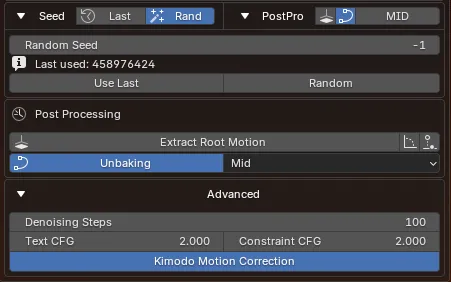
Root extraction is only available when Rig Setup includes a real Root Controller.
If the rig was set up with No Root Controller, Blaze Puppeteer can still generate motion, but the separate root extraction controls do not appear because there is no dedicated root control to write into.
| Control | What it does |
|---|---|
| Extract Root Motion | Moves the main trajectory onto the root controller |
| Extract Rotation | Moves yaw and facing changes onto the root controller |
| Ground Tracking | Calculates the root controller’s vertical motion |
Generated motion usually arrives with baked keyframes. Unbaking simplifies the curves and reduces keyframes without affecting the motion.
| Quality | Result |
|---|---|
| Low | Keeps more keys and preserves more local detail |
| Mid | Balanced keyframe reduction for most review and handoff work |
| High | Stronger keyframe reduction while preserving the same overall motion |
| Situation | What happens |
|---|---|
| You generate new motion while PostPro is enabled | The current PostPro settings are applied automatically and saved on that new History entry |
| You select another History action | Blaze Puppeteer restores that History entry’s own cleanup state |
| You retry a motion | The current PostPro settings are applied to the new retry result when it is created, then that result keeps its own saved PostPro state |
| You refine a motion | The current PostPro settings are applied to the new refinement result when it is created, then that result keeps its own saved PostPro state |
This is why History review matters: cleanup is part of evaluating each generated motion, not a single global setting for the whole rig.
Play the selected History action before changing anything so you know what the generated result actually was.
If the motion contains trajectory changes, test Extract Root Motion first, then decide whether Extract Rotation and Ground Tracking help.
Turn Unbaking on and compare Low, Mid, and High on the same motion.
If the cleanup helped, keep working from that History entry. If it did not, switch entries, retry, or move into refinement.